Lab Log
구글 개발자가 인정한 성능 최적화 기여 후기 - AI와 함께한 gemini-cli 오픈소스 여정
구글 개발자에게 인정받은 성능 최적화: gemini-cli 기여 후기
이 글을 읽고 나면
- AI와 협업해서 오픈소스 기여하는 방법을 알게 됩니다
- 성능 최적화 PR이 더 좋은 평가를 받는 이유를 이해합니다
- 구글같은 대기업 프로젝트에 기여하는 전략을 배웁니다
- 실제 머지된 PR 사례를 통해 구체적인 노하우를 얻습니다
들어가며
"내 코드를 구글의 프로젝트에 넣을 수 있다니!"
2025년 6월 25일 gemini-cli가 출시되었습니다. CLI 환경의 AI 도구들이 쏟아져 나오는 요즘, 이 프로젝트가 특별했던 이유는:
- JavaScript 기반: 익숙한 기술 스택
- 화제성: 출시 직후부터 관심 집중
- 작은 코드베이스: 아직 분석 가능한 규모
- 개선 여지: 급하게 만들어진 티가 여기저기 보임
- 적극적인 오픈소스: 전세계 개발자들의 참여를 적극 유도
무엇보다 구글러들에게 직접 코드리뷰를 받을 수 있다는 점이 가장 매력적이었습니다.
기여할 것을 찾아보자
설레는 마음으로 코드베이스를 뜯어보기 시작했습니다.
ai와 함께 코드베이스를 분석하고 기여할 점을 부탁 하였습니다.
ex) 사용했던 프롬프트
User
여기는 gemini-cli 프로젝트예요. 함께 개선할 점을 찾아봐요!
AI Assistant
read-many-files.ts에서 파일 처리가 동기적으로 이뤄지고 있어요. 개선 방향은 아래와 같아요:
- for...of 순회를 Promise 목록 기반 병렬 처리로 전환
- detectFileType 함수를 비동기로 변경
User
개선할 코드 제안해주고 이게 어떤 이점을 가져오는지 설명해줘
AI Assistant
(변경 코드 보여주고 설명 하는 중)
성능관련 기여를 할 수 있다고 생각을 했고 메인테이너의 입장에서는새로운 기능을 추가하는 PR은 메인테이너 입장에서 고려할 게 많습니다.
프로젝트의 방향성과 맞는지, 다른 기능과 충돌은 없는지, 앞으로 유지보수 비용은 어떨지 등등... 하지만 성능 개선 PR은
빚을 갚아주는 것과 같습니다.누구도 마다할 이유가 없죠. 프로젝트를 더 건강하게 만드는, 가장 환영받는 기여 중 하나입니다.
하지만 너무 바꿀 범위가 많다고 생각을 했습니다. 그래서 pr을 2개 쪼개어 날리기로 했습니다.
두 번이나 pr을 날릴수도 있고 계획적으로 나만의 로드맵을 그려갈 수 있다고 생각을 했습니다.
- fileUtils.ts -> 개선
- read-many-files.ts -> 병렬처리로 전환
기여 시작
1차 기여: fileUtils.ts 비동기 전환
detectFileType 만 비동기로 만들어도 되었지만
ai는 나에게 좀 더 몇 가지 개선점을 알려주었습니다.javascript// AS-IS export function isBinaryFile(filePath: string): boolean { try { const fd = fs.openSync(filePath, 'r'); // Read up to 4KB or file size, whichever is smaller const fileSize = fs.fstatSync(fd).size; if (fileSize === 0) { // Empty file is not considered binary for content checking fs.closeSync(fd); return false; } const bufferSize = Math.min(4096, fileSize); const buffer = Buffer.alloc(bufferSize); const bytesRead = fs.readSync(fd, buffer, 0, buffer.length, 0); fs.closeSync(fd); if (bytesRead === 0) return false; let nonPrintableCount = 0; for (let i = 0; i < bytesRead; i++) { if (buffer[i] === 0) return true; // Null byte is a strong indicator if (buffer[i] < 9 || (buffer[i] > 13 && buffer[i] < 32)) { nonPrintableCount++; } } // If >30% non-printable characters, consider it binary return nonPrintableCount / bytesRead > 0.3; } catch { // If any error occurs (e.g. file not found, permissions), // treat as not binary here; let higher-level functions handle existence/access errors. return false; } } // TO-BE export async function isBinaryFile(filePath: string): Promise<boolean> { let fileHandle: fs.promises.FileHandle | undefined; try { fileHandle = await fs.promises.open(filePath, 'r'); // Read up to 4KB or file size, whichever is smaller const stats = await fileHandle.stat(); const fileSize = stats.size; if (fileSize === 0) { // Empty file is not considered binary for content checking return false; } const bufferSize = Math.min(4096, fileSize); const buffer = Buffer.alloc(bufferSize); const result = await fileHandle.read(buffer, 0, buffer.length, 0); const bytesRead = result.bytesRead; if (bytesRead === 0) return false; let nonPrintableCount = 0; for (let i = 0; i < bytesRead; i++) { if (buffer[i] === 0) return true; // Null byte is a strong indicator if (buffer[i] < 9 || (buffer[i] > 13 && buffer[i] < 32)) { nonPrintableCount++; } } // If >30% non-printable characters, consider it binary return nonPrintableCount / bytesRead > 0.3; } catch (error) { // Log error for debugging while maintaining existing behavior console.warn( `Failed to check if file is binary: ${filePath}`, error instanceof Error ? error.message : String(error), ); // If any error occurs (e.g. file not found, permissions), // treat as not binary here; let higher-level functions handle existence/access errors. return false; } finally { // Safely close the file handle if it was successfully opened if (fileHandle) { try { await fileHandle.close(); } catch (closeError) { // Log close errors for debugging while continuing with cleanup console.warn( `Failed to close file handle for: ${filePath}`, closeError instanceof Error ? closeError.message : String(closeError), ); // The important thing is that we attempted to clean up } } } }
fs.promises 를 붙인 것만으로도 아래와 개선 효과를 볼 수 있다는 걸 ai와 함께 정리 했습니다.
주요 차이점
1. 동기 vs 비동기 처리
- AS-IS: 동기 함수 (
function) - TO-BE: 비동기 함수 (
async function)
2. 파일 시스템 API
- AS-IS: 동기 메서드들
fs.openSync(),fs.fstatSync(),fs.readSync(),fs.closeSync()
- TO-BE: 비동기 Promise 기반 메서드들
fs.promises.open(),fileHandle.stat(),fileHandle.read(),fileHandle.close()
3. 에러 처리
- AS-IS: 간단한
catch블록 - TO-BE: 상세한 에러 로깅 +
finally블록으로 리소스 정리
4. 리소스 관리
- AS-IS: 명시적
fs.closeSync(fd)호출 - TO-BE:
finally블록에서 안전한 파일 핸들 정리
장단점 비교
AS-IS 장점
✅ 간단함: 코드가 직관적이고 이해하기 쉬움
✅ 동기 처리: 순차적 실행으로 디버깅이 용이
✅ 가벼움: 추가 Promise 오버헤드 없음
AS-IS 단점
❌ 블로킹: 파일 읽기 중 다른 작업 불가
❌ 에러 정보 부족: 디버깅 시 구체적 오류 정보 없음
❌ 리소스 누수 위험: 예외 발생 시 파일 디스크립터 정리 불완전
TO-BE 장점
✅ 상세한 에러 처리:
console.warn으로 디버깅 정보 제공✅ 안전한 리소스 관리:
finally 블록으로 확실한 정리✅ 확장성: 비동기 생태계와 잘 맞음
TO-BE 단점
❌ Promise 오버헤드: 작은 성능 비용 발생
❌ 호출부 변경 필요:
await 키워드 추가 필요권장사항
대량 파일 처리나 웹 서버 환경에서는 TO-BE 방식을, 간단한 CLI 도구나 소규모 스크립트에서는 AS-IS 방식이 적합합니다.
fs.promises API 설명
기본 개념
fs.promises 는 Node.js의 파일 시스템 모듈에서 Promise 기반의 비동기 API를 제공하는 네임스페이스입니다.
주요 차이점
fs.openSync() - 동기 방식
javascriptconst fd = fs.openSync('/path/file', 'r'); // ✅ 즉시 파일 디스크립터 반환 // ❌ 파일이 열릴 때까지 코드 실행 중단 (블로킹) // ❌ 이벤트 루프 차단
fs.promises.open() - Promise 방식
javascriptconst fileHandle = await fs.promises.open('/path/file', 'r'); // ✅ Promise 반환으로 논블로킹 // ✅ 다른 작업과 병렬 처리 가능 // ✅ FileHandle 객체 반환 (더 안전한 API)
fs.promises API의 핵심 특징
1. FileHandle 객체
javascript// 기존: 단순 숫자 파일 디스크립터 const fd = fs.openSync('file.txt', 'r'); // 3 (숫자) // fs.promises: FileHandle 객체 const fileHandle = await fs.promises.open('file.txt', 'r'); // { fd: 3, read: Function, write: Function, close: Function, ... }
2. 자동 리소스 관리
javascript// 위험한 패턴 (동기) const fd = fs.openSync('file.txt', 'r'); // 에러 발생 시 close 안됨 const data = fs.readSync(fd, buffer, 0, buffer.length, 0); fs.closeSync(fd); // 안전한 패턴 (Promise + try/finally) let fileHandle; try { fileHandle = await fs.promises.open('file.txt', 'r'); const data = await fileHandle.read(buffer, 0, buffer.length, 0); } finally { await fileHandle?.close(); // 항상 정리됨 }
3. 병렬 처리 지원
javascript// 동기: 순차 처리만 가능 const file1 = fs.readFileSync('file1.txt'); const file2 = fs.readFileSync('file2.txt'); const file3 = fs.readFileSync('file3.txt'); // Promise: 병렬 처리 가능 const [file1, file2, file3] = await Promise.all([ fs.promises.readFile('file1.txt'), fs.promises.readFile('file2.txt'), fs.promises.readFile('file3.txt'), ]);
언제 사용해야 할까?
fs.promises 사용 권장
- 웹 서버, API 서버
- 대량 파일 처리
- 사용자 상호작용이 있는 앱
- 다른 비동기 작업과 함께 사용
fs.openSync 사용 권장
- 빌드 스크립트, CLI 도구
- 간단한 일회성 작업
- 성능보다 단순함이 중요한 경우
실제 이슈 & PR 작성법 공개
구글러들을 설득한 실제 문서를 보여드리겠습니다:
이슈 #3286
markdown# Convert synchronous file binary detection to async to eliminate event loop blocking ## 🚨 Problem Current file binary detection uses synchronous file operations that: - Block Node.js event loop causing UI freezing - Prevent concurrent file processing - Create poor scalability for large projects ## 📊 Expected Benefits - 20-80% performance improvement depending on project size - Improved UI responsiveness - Enables concurrent file processing foundation ## 🎯 Technical Solution - Convert `isBinaryFile()` and `detectFileType()` to async - Use `fs.promises` API for non-blocking operations - Update all callers to use `await`
PR #3288
markdown# feat: Make file type detection and binary checks asynchronous (#3286) ## 🔧 Changes Made - Converted sync file operations to async implementations - Used `fs.promises` for non-blocking file I/O - Enhanced resource management with proper cleanup - Updated test cases for async compatibility ## 💡 Why This Matters "The original sync file operations were blocking the Node.js event loop, causing UI freezes and poor performance when processing multiple files." ## 🎯 Next Steps This lays the foundation for parallel file processing (coming in next PR)
리뷰어 반응:
- Gemini Code Assist: "clean and thorough implementation"
- NTaylorMullen: "Thanked for the contribution" ✅ 승인
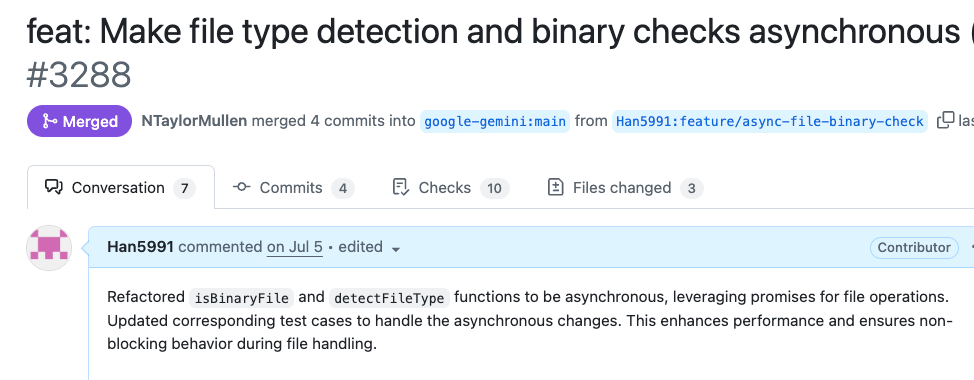
첫 PR이 성공적으로 머지되었을 때의 기쁨은 정말 컸습니다.
이슈 등록부터 시작해 제 코드로 직접 성능 개선에 기여했다는 성취감, 그리고 다음 기여를 위한 발판까지 마련했다는 생각에 뿌듯했습니다.
2차 기여: 병렬 처리로 성능 개선
1차 PR 머지 후, 바로 2차 이슈와 PR을 진행했습니다.
📈 2차 작업: 74% 성능 개선
🎯 이슈 #4712
markdown# Implement batch/parallel file processing for performance optimization ## 🚀 Goal Improve file processing performance for large projects by implementing parallel processing ## 📊 Expected Impact - 20-80% performance improvement - Better UX for large projects - Leverage async foundation from previous PR #3288
💥 PR #4763
markdown# perf(core): implement parallel file processing for 74% performance improvement ## 🔥 Performance Results - **Before**: 408ms (sequential processing) - **After**: 107ms (parallel processing) - **Improvement**: 74% faster! 🚀 ## 🛠️ Technical Implementation - Replaced sequential for-loop with Promise.allSettled() - Maintained error isolation for individual files - Added comprehensive performance test coverage
리뷰어들의 극찬:
- jacob314: "Praised the performance optimization and test coverage" ✅ 승인
- SandyTao520: 머지 완료
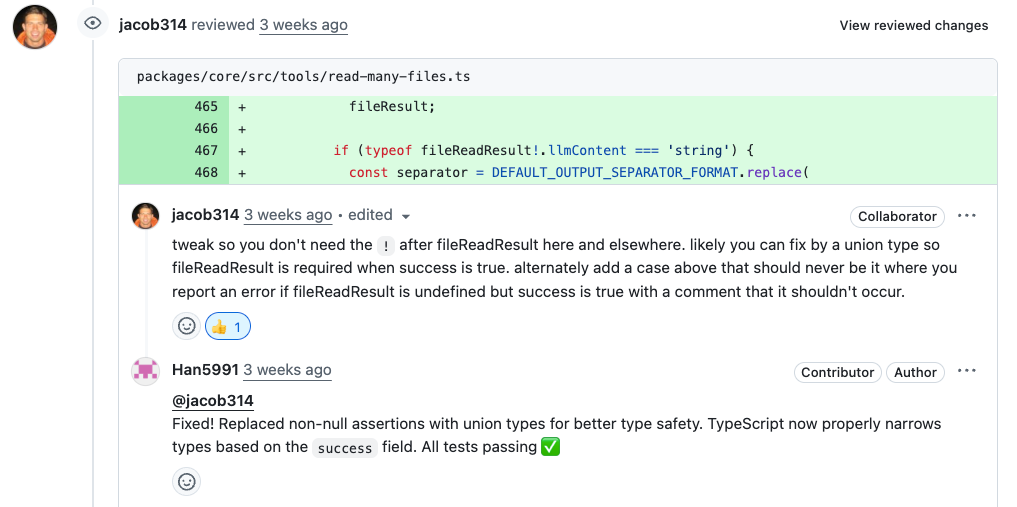
리뷰어는 ! non-null assertion이 잠재적 버그를 가릴 수 있다고 지적했습니다.
파일 처리 중 실패하는 엣지 케이스에서 에러를 던지는 대신 undefined를 반환하며 조용히 넘어가버릴 수 있기 때문입니다.
그의 지적에 따라, 성공과 실패 케이스를 명확히 구분하는 Result 타입을 도입하여 코드의 안정성을 한층 높일 수 있었습니다.
작은 기호 하나에도 깊은 뜻이 있다는 것을 배운 순간이었습니다.
그래서 이렇게 타입을 만들어 성공과 실패 케이스를 나누어서 처리를 하였습니다.
typescript/** * Result type for file processing operations */ type FileProcessingResult = | { success: true; filePath: string; relativePathForDisplay: string; fileReadResult: NonNullable< Awaited<ReturnType<typeof processSingleFileContent>> >; reason?: undefined; } | { success: false; filePath: string; relativePathForDisplay: string; fileReadResult?: undefined; reason: string; };
그리고 성능이 중요하다고 생각 하여 병렬 처리에대한 속도 처리 테스트를 만들어 넣었습니다.
typescriptit('should process files in parallel for performance', async () => { // Mock detectFileType to add artificial delay to simulate I/O const detectFileTypeSpy = vi.spyOn( await import('../utils/fileUtils.js'), 'detectFileType', ); // Create files const fileCount = 4; const files = createMultipleFiles(fileCount, 'Batch test'); // Mock with 100ms delay per file to simulate I/O operations detectFileTypeSpy.mockImplementation(async (_filePath: string) => { await new Promise(resolve => setTimeout(resolve, 100)); return 'text'; }); const startTime = Date.now(); const params = { paths: files }; const result = await tool.execute(params, new AbortController().signal); const endTime = Date.now(); const processingTime = endTime - startTime; console.log(`Processing time: ${processingTime}ms for ${fileCount} files`); // Verify parallel processing performance improvement // Parallel processing should complete in ~100ms (single file time) // Sequential would take ~400ms (4 files × 100ms each) expect(processingTime).toBeLessThan(200); // Should PASS with parallel implementation // Verify all files were processed const content = result.llmContent as string[]; expect(content).toHaveLength(fileCount); // Cleanup mock detectFileTypeSpy.mockRestore(); });
성능 테스트가 게임 체인저였다!
구글러들이 특히 좋아한 부분은 구체적인 성능 측정 테스트였습니다.
typescript// 실제 성능 개선을 증명하는 테스트 it('should process files in parallel for performance', async () => { // 4개 파일 처리 시간 측정 const startTime = Date.now(); const result = await tool.execute(params, signal); const endTime = Date.now(); const processingTime = endTime - startTime; // 🎯 병렬 처리 효과 검증: 400ms → 200ms 이하 expect(processingTime).toBeLessThan(200); // ✅ PASS! });
jacob314의 극찬: "Praised the performance optimization and test coverage"
** 결과:**
- 74% 성능 향상: 408ms → 107ms
- 구체적 증거: 테스트 코드로 성능 개선 입증
- 빠른 승인: 성능 데이터 덕분에 논의 없이 바로 머지
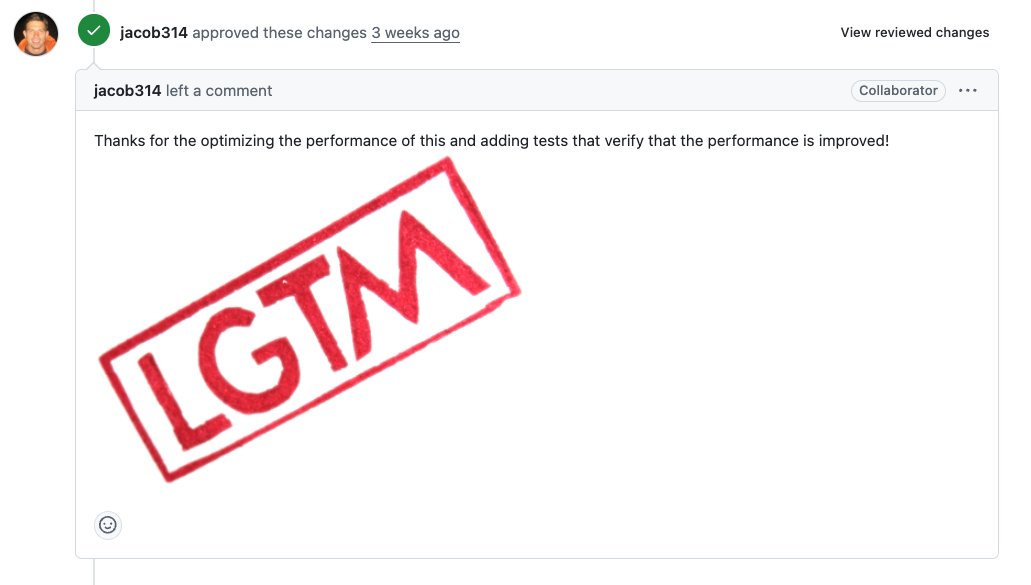
이번 PR은 이전 작업과의 연관성을 명시해서 승인이 매우 빠르게 났습니다.
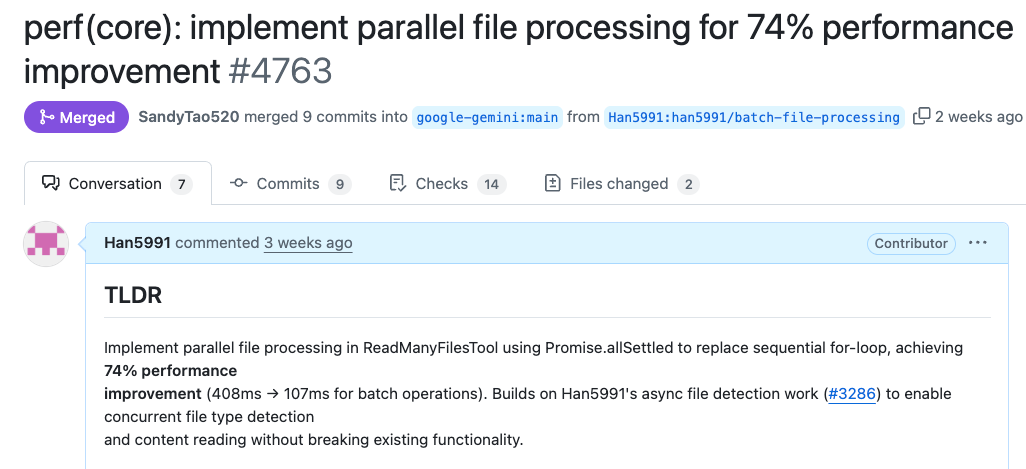
여러분도 구글 프로젝트에 기여해보세요!
이번 경험을 통해 확실히 알게 된 것들:
- AI와 함께하면 코드베이스 분석이 훨씬 수월함
- 작은 PR부터 시작하면 리뷰어의 신뢰를 얻을 수 있음
- 성능 테스트까지 포함하면 더 좋은 평가를 받음
- 이전 작업과의 연관성을 명시하면 승인이 빨라짐
다음 액션 플랜
이 성공적인 기여 경험을 바탕으로, 더 큰 임팩트를 만들어갈 계획입니다.
단기 목표
- gemini-cli의 TODO 이슈들을 지속적으로 해결하며 핵심 컨트리뷰터 지위 확보
- 성능 최적화, 에러 핸들링, 사용자 경험 개선 등 고부가가치 기여 집중